Phone Numbers
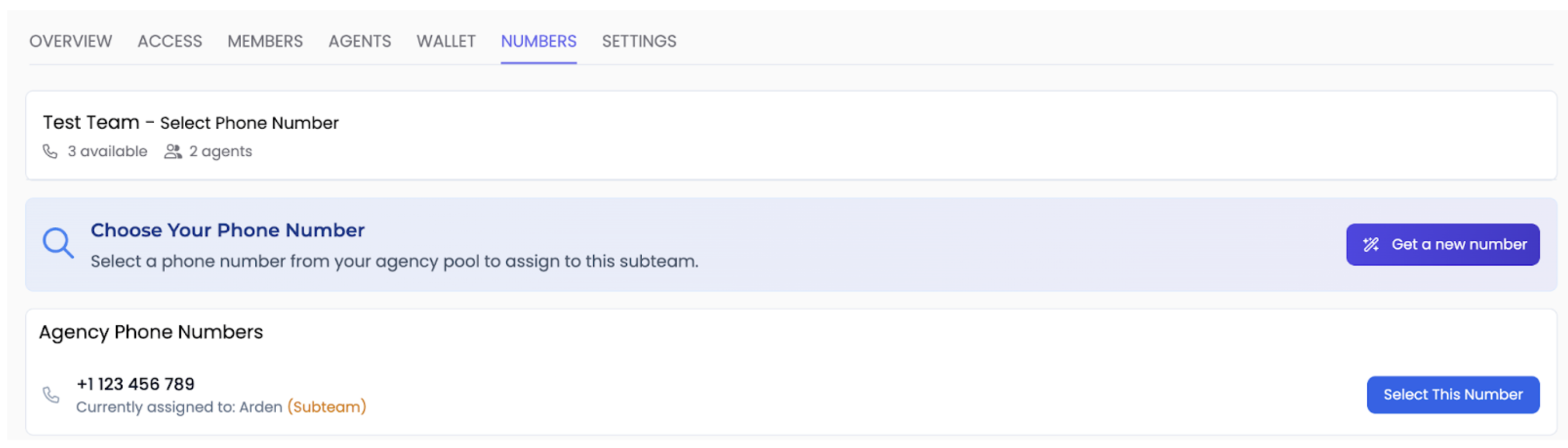
The numbers section in the subteam's configuration will show you all the available numbers in your "Parent Account". This page allows you to allocate these numbers to any of the agents in the subteam's account.
Understanding Phone Number Allocation
Centralized Number Pool
All phone numbers are managed from your Parent Account. When you allocate a number to a subteam's agent, you're giving that specific agent permission to use the number for incoming and outgoing calls. The number remains owned by your parent account, but is functionally assigned to the client's agent.
How to Allocate Phone Numbers
Navigate to the Numbers Tab
Navigate to Numbers tab within the subteam.
Select an Available Number
Locate the number you wish to assign and press "Select This Number".
Assign to an Agent
You will then be prompted with a selection of all the agents created in the subteam. You may select any agent to assign the number to.
💡 Tip: Make sure the agent you're assigning the number to is fully configured and ready to handle calls before making the assignment.
Best Practices
📋 Track Assignments
Keep a record of which numbers are assigned to which clients and agents for easy reference and troubleshooting.
🔄 Reassign as Needed
Numbers can be reassigned between agents or subteams if business needs change. Simply select a new agent for the number.
🎯 Strategic Allocation
Consider assigning local or toll-free numbers based on your client's target market and customer preferences.
✅ Test After Assignment
Always test the phone number after assignment to ensure it's properly connected and the agent is responding correctly.
Important Notes
⚠️ Number Ownership: All phone numbers remain owned by your Parent Account. Subteams do not have direct ownership or billing responsibility for the numbers assigned to their agents.
💡 Availability: Only numbers from your Parent Account's number pool are available for assignment to subteams. Subteams cannot purchase or manage their own phone numbers.
✅ Great work! You've successfully allocated phone numbers to client agents. Next, learn how to manage the client team's wallet and credit usage.