Create the Client's Sub-Team (Sub-Account)
Learn how to create and configure new client sub-accounts with custom credit limits and access controls for streamlined client management.
Creating Your First Sub-Team
Navigate to the Agency Tab
Navigate to the Agency tab in your main menu on the left hand side.
Click Add Subteam
Click "+ Add Subteam" to create a new team account. A pop-up box will appear, complete the required fields.
Complete the Required Fields
Required Fields
First Name*
Team super-user's first name.
Last Name*
Team super-user's last name.
Team Name*
Name the sub-team (e.g., "Client Name - Sub-Account" or "Company Name").
Email*
Team super-user's email address.
Credit Limit Configuration
Choose No Limit (Unlimited) or Limited Credits. When limited, enter a Monthly Credit Limit — the maximum number of credits this subteam can use per billing cycle.
Access Configuration
The agency can set specific limits and feature flags for their users' accounts, allowing them to create customized experiences and user journeys. Feature options include:
- Users Management – Invite users to the team
- Instructions Read – Read access to instructions
- Instructions Write – Write access to instructions (requires both read and write access to edit)
- Testing – Ability to test Voice and Chat
- Knowledge Base – Can add knowledge base entries
- Agent Configuration – Access to the agent configuration page
- Agent Creation – Can create new agents.
💡 Tip: You may navigate to the https://echo.win/portal/agency/config/access to set defaults so the next time you create sub-teams the default will be auto applied.
📧 Note: Creating subteam triggers an email notification to the new user which prompts them to set up their password.
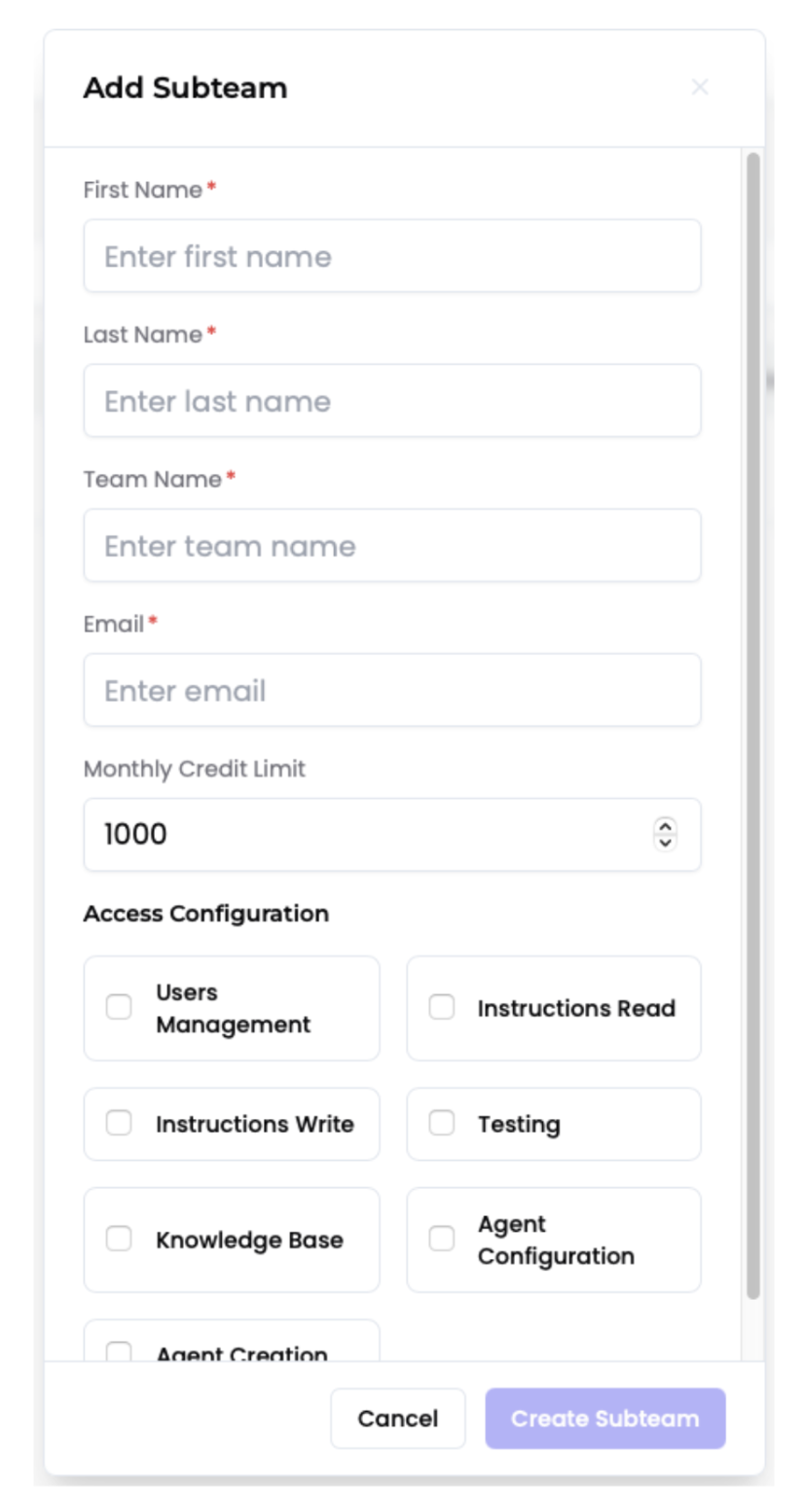
Subteam creation Form
Add Yourself as Super Admin
Agencies have the availability to gain full access to its sub accounts. This adds the owner as a member of the user's team to make changes as necessary.
Navigate to the Subteam
Navigate to Agency / Subteams and select the desired subteam.
Add Super Admin Access
Click Add Me As Super Admin to assign yourself the role for this sub-team. This grants you full management access for client setup.
⚠️ Note: This access may have an automatic expiration (e.g., 15 days) for security and best practice, requiring you to re-assign or request access later if needed.

Subteam Member Configuration
✅ Great! You've successfully created a client sub-team and granted yourself Super Admin access. Next, you'll want to add team members to the client's account.